Sunday, 8 April 2012

Learning Ouctome One:


Understand characteristics of different acoustic environments in relation to recording sound:


Location recording analysis


The objective of this task was to record being in a quiet environment and then a separate recording in a loud environment. We had to explain in our recording what we could hear or see that was making the noises our recorder was picking up. Then we were asked to analyse the recordings and explain in detail what was going on in each recording and what was making the noise and compare the difference between recording in a quiet environment and a loud environment.

The recordings: 


Quiet environment recording which took place in library


Before we entered the library we turned on our microphone and explained where we were recording. This is probably the most difficult environment to analyse purely for the fact that in the library there were signs everywhere saying “silence please”. The mike didn’t pick up any speech at all while we recorded in the library.


There were a number of very quiet sounds I picked up though, they sounded like chairs scraping along the floor it was a very low pitch and because it was quiet im guessing the person who was getting out of the chair must have been quite far away from the recorder.


There were a few coughs as well all in very deep low pitched voices and sounding like they were coming from a distance. One small problem I have noted from this recording is the weird noises that were being picked up by the mike throughout being in the library. I know what this was because when I was looking at the person who holding the microphone they were tapping it around the desk for some strange reason, which is what I am linking to that strange noise I heard in the recording.


That is my analysis for the quiet environment recording, one alternation I would make next time if I had the chance would be to do the recording in a room/ area with more noise going on it, the library was very difficult to analyse as it was very quiet.


Loud environment recording which took place next to a busy road in Henley


We start off with me explaining that we are next to a road in Henley. One of the people explains that car is approaching. You can tell it is approaching you because the pitch is deep but the noise is getting gradually louder and louder until it is right next to us and the car noise is at its highest volume possible then the volume of the car gradually starts decreasing more and more until it’s gone. At 1:20 in the recording clip a lorry starts coming up the road towards us, you can tell without vision because the engine (noise) of the vehicle sounds very different to a car. Lorrys require a larger engine to be able to drive their massive vehicle and cargo at a steady but fast speed.


The engine of the lorry has a much deeper sound to it than the car that passed by earlier. I also noted that there was a choking like noise coming from the engine presumably which I heard the easiest when the Lorry was at its loudest point (right beside us).


Unfortunately part of the recording clip was ruined by someone who was making immature comments and noises. This took place after 1:30 Ietherw ay though it still picked up the persons voice very well even though he hadn’t said it that loud the mike picked it up far louder than we had expected.


The rest of the clip was without us saying into the mike what we could see or hear. One very cool sound I discovered while playing back was at 1:53 where you couldn’t hear much apart from this very annoying constant rustling which was actualy leaves on the floor, we were walking underneath a lot of trees by the road. The rest of the noises in the last 20 seconds of the audio clip were just cars deep pitches growing louder and louder in sound as they got closer and then gradually becoming quieter as they drove further away from us.


Two small differences id makes to that recording would firstly be the wind; I could constantly hear the wind in the background of the recording because the mike picks up sounds far away so easily it picks up the smallest and hardest of sounds to hear such as wind. Secondly I feel very strongly that we should have recorded over the people trying to be funny in the background of our audio clip because it was not part of our assignment to include that and it looked very un-professional.


Did the equipment work properly how did you plan this project out?


My group and I had a major problem on the first day of recording, everything as going fine, we had recorded everything we need to at our locations but when we came to transfer them onto computer via usb cable it wouldn’t transfer them, we tried changing computers accounts and usb cables but nothing would make it work so we were now one lesson behind on recording.


The next lesson which was a week later we had another attempt at recording our original locations but we also had to catch-up and do another recording of an interview. This time we took a different recording device and sub cable with us. The recording went successful although we did have to rush to catch-up with everyone else but the best part was that the audio files transferred to the computer this time.


All the equipment worked well putting aside the first attempt of recording our sounds at our locations. One small item that could have been useful if we had one was a wind shadow; they are small devices that can usually fit around the edges of mikes to protect them from picking up the annoying wind noise like ours did.


Indoor location recording analysis (interview)


The objective?


We were told to record an interview between two people (interviewer and interviewee) plus the one extra person who would record the interview. The interview had to be recorded inside a room/ building and was not allowed to be recorded outside. The interview could not be made up and had to be a real interview either from the internet or a magazine.

The recording:


The interview recording analysis


The location we chose was an empty staircase inside R6 in the Rothefield site of Henley College. The interview was three minutes long and to be honest was very boring, but the quality of the interview was professional standard. Jack was the interviewee, Charlie was the interviewer and I was the person recording the interview.


I have allot of experience of interviews and the standards they require to sound good, the reason being is that at my secondary school I did drama and I was the technician and for one of our plays I needed to take recordings of some dialogue to play in the background of our performance.


At the first 20- 30 seconds of our interview I deliberately held the mike behind the two people talking during the interview. After that I then held the mike close to each person face, so when Jack was talking it would be close to his face and then when it was Charlie’s turn I would change the mike to facing his mouth and ect.


The difference between the first 30 seconds of the interview and the rest is very different. If I had to rate I would say the first 30 seconds sounds like it’s done by an amateur and the rest is done by a professional.


The first 30 seconds of the interview sounds horrid, the voices sound like they are talking from a distance and is also very wavery. Here are my reasons why the first 30 seconds did not sound like good quality which I learnt from my drama class back in secondary school. Firstly think of the mike as a camera, pretend the lens of the camera is at the tip of the microphone, and then think about line of sight. For my first 30 seconds of the video the line of sight was pointing at the backs of the people doing the interview. So it wasn’t picking up the best quality sound it possible could.


After the first 30 seconds had gone by I then moved the my microphone over the shoulder of the two people doing the interview in turn point the mikes line of sight at the person who was talking at the time and then switching between the two of whoever was talking at the time. The two main rules I stick too for professionally recording dialogue or in our case an interview are firstly making sure the mikes are very close to whoever is talking at the time and secondly always use my line of sight method which in this case would be making sure the line of sight is pointed directly at the persons mouth as they speak.


The rest of the interview went by very smoothly and professionally as I had intended for it do so. The voices were clear as crystal throughout with the occasional gap of no speech where we lost track of where we were on the interview sheet but were being judged on the sound quality not the presentation of words so it’s not a problem.


There is nothing I feel that I could do differently to make the interview sound any better than it did apart from maybe taking out the first 30 seconds of the interview and re doing it in professional standard but I did the first 30 seconds of the interview deliberately so that I could explain/ analyse to people between a standard quality interview and a professional quality interview.  


We used the same equipment with this interview as we did with the quiet and loud environments, so there’s no need to explain that they worked fine. I am very impressed that me and my group managed to get all this recording squeezed into one lesson considering that everyone else had two lessons to complete these sound recordings.

Saturday, 7 April 2012

Learning Outcome Two:

Understand conventions in audio production and post-production:


The video above covers the following:
 
Technical conventions: studio layout and operation; recording and playback formats; file transfer and
transfer bays; linear and non-linear recording systems; ISDN; telephone; delay lines; profanity and
blasphemy; effects; sequences; production and post-production stages and processes; production roles
Legal issues: copyright; performing rights; licences; contracts


Thursday, 8 March 2012

Learning Outcome Three:

Microphone types and characteristics

History of the microphone:
Here is a small detailed timeline of history of how the microphone was invented and how it progressed through years. The first person to use the word microphone was Sir Charles Wheatstone in 1827. In 1876, Emile Berliner was the person to invent the first microphone which was used as a voice transmitter, known as a telephone today. He did not invent the telephone, but improved it with the microphone.
By the time 1878 came around, David Edward Hughes invented the carbon microphone which was later developed during the 1920s. With the invention of the radio, new broadcasting microphones also were invented. There would not be a history of microphones if these things did not take place.
James West and Gerhard Sessler of Bell laboratories played a big part in the history of microphones in the year 1964 as they received patent number 3,118,022 for their transducer which is an electric microphone. It offered something previous microphones had not, greater reliability and higher precision with something all consumers loved, a lower price.

This part in the history of microphones revolutionized the industry and made it possible for general consumers to obtain the product. Almost one billion of these microphones were manufactured each year.

 Dynamic and condenser microphones were developed in the 1970s because they offer a great amount of sensitivity perfect for broadcasting with. To this day they are used by broadcasters worldwide.
Microphone history dates back to the 1800s so it is possible to see why we have come to such great lengths in offering top of the line, high quality products by many different manufacturers.
How a microphone works:
Here is a diagram that will explain how a microphone converts sound energy into electrical energy. I have labelled each part of the diagram from 1-5 to explain each step of how the microphone works.

  1. When you speak, sound waves created by your voice carry energy toward the microphone. Remember that sound we can hear is energy carried by vibrations in the air.
  2. Inside the microphone, the diaphragm (much smaller than you'd find in a loudspeaker and usually made of very thin plastic) moves back and forth when the sound waves hit it.
  3. The coil, attached to the diaphragm, moves back and forth as well.
  4. The permanent magnet produces a magnetic field that cuts through the coil. As the coil moves back and forth through the magnetic field, an electric current flows through it.
  5. The electric current flows out from the microphone to an amplifier or sound recording device. Hey presto, you've converted your original sound into electricity! By using this current to drive sound recording equipment, you can effectively store the sound forever more. Or you could amplify (boost the size of) the current and then feed it into a loudspeaker, turning the electricity back into much louder sound. That's how PA (personal address) systems, electric guitar amplifiers, and rock concert amplifiers work.
Types of microphone:
Dynamic microphone: They work using electromagnetic induction. They can be handled with ease because they are extremely robust and are also relatively cheap to buy. Dynamic microphones are also resistant to moisture.
Capacitor microphone: Capacitor microphones can respond to extremely high audio frequencies. They are usually more sensitive than their dynamic counterparts meaning they require less amplification than dynamic models to produce the same output level from the same signal source. This means quieter or distant sound sources are suited to them better. 
Electret condenser: An electret condenser microphone consists of a very light diaphragm (moving plate) and back plate (stationary or static plate) and has a permanent charge implanted in an electret material to provide polarizing voltage. The principle of operation is that sound waves impinging on the diaphragm cause the capacitance between it and the back plate to change synchronously, this in turn induces an AC voltage on the back plate.
1.                   Foil Electret Condenser Microphone (also called Middle or Classic) - Type of condenser microphone where the electret material is the diaphragm. (Sometimes referred to as "Front" type.)
2.                   Back Electret Condenser Microphone -Type of condenser microphone where the electret material is the back plate.
3.                   Front Electret Condenser Microphone -Type of condenser microphone where the electret material is

Ribbon: A Ribbon microphone is a type of microphone that uses thin aluminium, duralumin or sometimes nanofilm ribbon which is placed in-between the poles of a magnet which in turn generates voltages by electromagnetic induction.
Ribbon microphones are standard bidirectional which means that they pick up sounds equally on opposite sides of the microphone for example, the front of the microphone picks up just as well as the back of the microphone would pick it up.
Carbon: The carbon microphone is also known by many as a carbon button microphone, or sometime just a button microphone or a carbon transmitter. A carbon microphone is a sound to electrical signal transducer which consists of two metal plates which are separated by granules of carbon.
One of the plates faces outwards and acts as the diaphragm so that when sound waves strike this plate the pressure on the granules changes which then in turn changes the electrical resistance between the plates. A direct current is then passed from one plate to the other plate which causes the changing resistance to result in changing current which can be used in many ways such as being passed through a telephone system. Before the proliferation of vacuum tube amplifiers in the 1920’s, carbon microphones were the ONLY practical way of obtaining high levelled audio signals.
Crystal: In 1880, Jacques and Pierre Curie discovered the piezoelectric effect. Piezoelectric crystals were first used by Langevin in 1917, in connection with his research efforts in underwater acoustics using ultrasonic transducers. In 1919, using Rochelle Salt, Alexander Nicolson first demonstrated a variety of piezoelectric devices, including loudspeakers, phonograph pickups, and microphones.
  Problems in manufacturing crystals with uniformity and the necessary shapes prevented the commercial production of any of these devices. Almost 10 years later, C.B. Sawyer and C.H. Tower developed processes to manufacturer uniform complex-shaped piezo crystals. This led the way for many piezoelectric or crystal transducers, as they were first called.
 The crystal microphones work on the principal that certain crystals change their electrical properties as they change shape. By attaching a diaphragm to a crystal, the crystal will create a signal when sound waves hit the diaphragm and cause the crystal to deflect.
Lavalier: A Lavalier microphone is a small electret or either dynamic microphone that is used for mainly television purposes in order to be allowed hands free operation. You will most commonly find they have small clips provided with them to attach to collars ties and other clothing. The cord which is connected from the microphone to the radio frequency transmitter is usually hidden underneath clothing of whoever is using the lavalier microphone.
These miniature microphones are usually supplied with a choice of push on grills or differing lengths that provide a gentle high frequency boost for forming a resonant cavity. There is a peak of approximately 6 dB at 6-8 kHz which is considered necessary for compensating loss of clarity when chest mounted. This method of boosting high frequencies does not decrease the noise performance as electronic equalisation would do.
Rifle/ shotgun: Shotgun microphones are the highest directional microphones out of all of them. They have extremely small lobes of sensitivity to the rear, right and left but are significantly less sensitive to the rear and side than most other microphones. This is the result from placing the element at the rear end of a tube with slots cut along the sides.
Wave cancellation eliminates much of the off- axis sound. Due to the narrowness of the sesnsitivity area, Shotgun/ rifle microphones are most commonly used on television in programmes such as news channels where they are interviewing someone live and only want to capture theire voice alone.
Boom microphone: A boom microphone is a directional microphone mounted or attached to a pole or arm. Primarily used in film and television, a boom microphone frees the hands of actors or reporters while allowing them to enjoy the amplified audio of a traditional microphone. Boom microphones can also be used to amplify a group conversation, as it can be positioned so that everyone's voice can be heard.
A boom microphone is simple enough to fashion for amateur productions. A broomstick, microphone stand, or fishing pole can be used to hold the microphone aloft. In fact, on-set, this pole is often called a fish pole. One concern with this type of microphone is vibrations that could mar audio quality. Boom microphones are sensitive enough to pick up such unwanted vibrations as unsteady hands, for example. To prevent this, a boom microphone should include some type of isolating mechanism, such as foam padding or elastic suspensions.
Polar patterns:
Omnidirectional:
An omnidirectional microphone picks up sound equally 360 degrees around the microphone capsule. Omnidirectional microphones sound very open and natural, and are best suited for good acoustic environments or in a recording situation where an open, natural sound is desired.

Omnidirectional microphones can make some of the best recordings of acoustic instruments, given a good recording room. Their natural, open sound also makes binaural recording possible, if mounted properly. Omnidirectional microphones are not preferred for live sound, as they tend to be prone to feedback if amplified, but really shine for recording.
Figure of 8/ bi- directional:
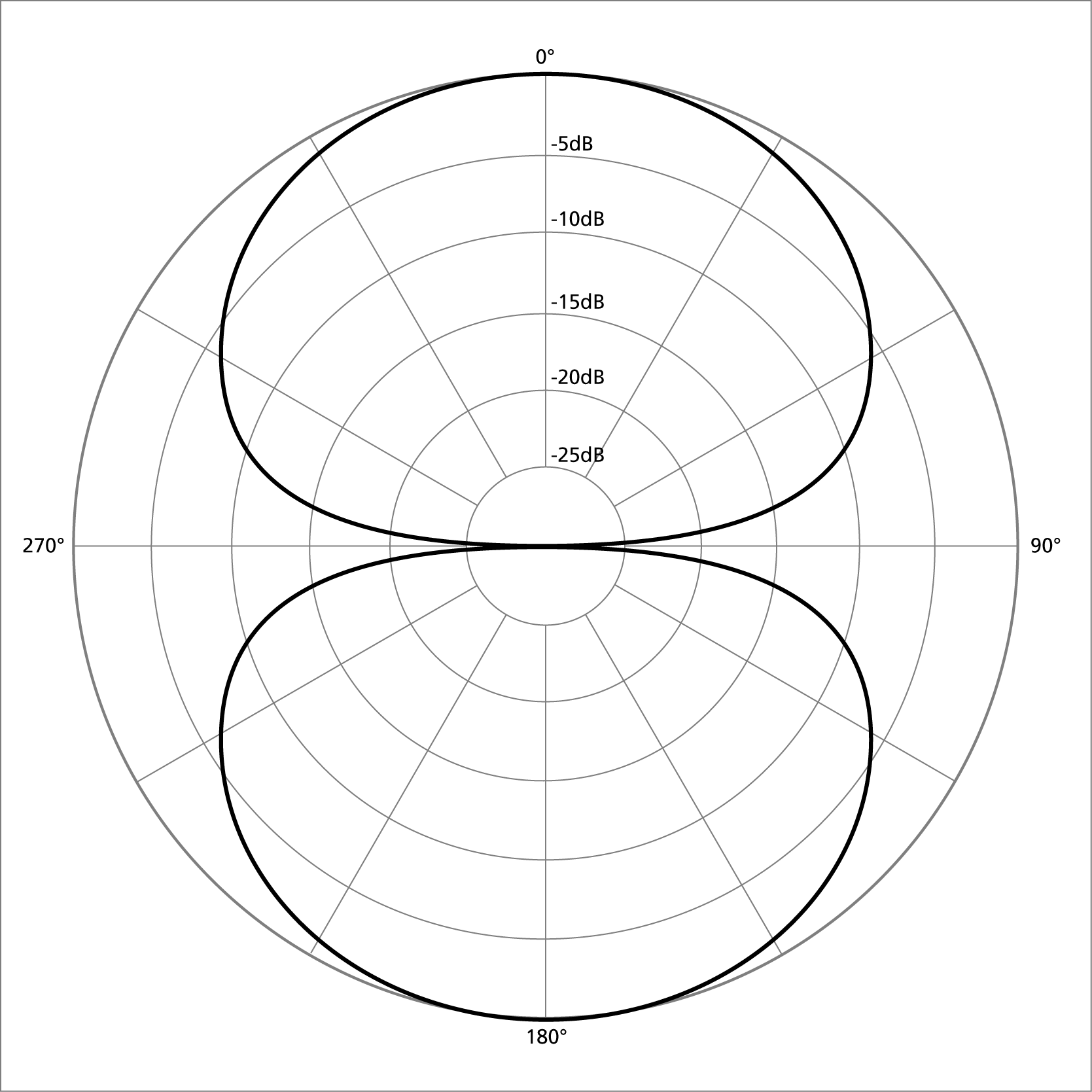
A figure-8 (or "bidirectional") microphone picks up sound equally from both sides of the mikes diaphragm. It rejects sound from the sides; as a cardioid pattern would, but picks up sound equally well from the rear as it does the side.

Most ribbon microphones are in figure-8 configurations. Ribbon microphones sound fantastic on acoustic instruments, in stereo configurations for live recording of acoustic and jazz groups, and as drum overheads. Due to their sensitivity, ribbon microphones aren't recommended for harsh, high-SPL environments. Figure-8 microphones are commonly used in "mid-side" recording setups.
Cardioid:
The most common microphone pickup pattern you'll encounter is the cardioid pattern. Cardioid means "heart-shaped", from the Greek root word "cardi". A cardioid pickup pattern means pickup to the front of the microphone and to a lesser extent the sides, with good rejection of sound to the back of the microphone.

Cardioid microphones are recommended for vocal applications, live taping/recording, and most other situations where the acoustics of the recording environment are good, but not perfect.
Hyper cardioid:
A hyper cardioid microphone (commonly referred to as "hyper") takes the cardioid concept a step further. A hyper cardioid microphone records from the front, a lesser extent to the sides, and rejects everything around 120 degrees to the back of the microphone. Hyper cardioid microphones work especially well for on-stage vocal applications (to help with monitor feedback) and live recording in far-away or difficult acoustic situations.
Line of gradient/ shot gun:
Line and Gradient or Shotgun microphones use a complex design that makes their polar pattern highly directional.
The capsule is placed behind an interference tube with small slits along the side. The tube eliminates sound from the sides due to phase cancellation. The longer the interference tube, the tighter the polar pattern, making the microphone better at rejecting sound from the side and more focused in the direction it is pointing.
Shotgun microphones are excellent for film and theatre work to pick up sound while keeping the microphone out of the camera’s view.
Application:
I will now explain what all the purposes of the microphones listed above are for. How they are used for different situations in recording or increasing the volumeincreasing the volume of sound.
Dynamic microphone: Dynamic microphones are principally used as vocal microphones on stage for example like a rock concert or a stand-up comedy in a large packed area. They are also less commonly used in studios such as a radio station for example.
Capacitor microphone: Capacitor microphones are most commonly used for recording studios only and are more suited to this task than Dynamic microphones because the capacitor microphone can change its frequency that means it can handle louder and quieter sounds easier than the dynamic microphone.
Electret condenser: Electret condenser microphones are most commonly used in small devices for communications such as mobile phones and telephones. This is what this type of microphone is most famous for.
Ribbon: Ribbon microphones were commonly used in the 1950’s for recording in studios and doing television broadcasts. These days though, dynamic microphones have taken these purposes from the ribbon microphone. However the Ribbon microphone is still used for different purposes these days such as picking up sounds from stringed instruments and the electric guitar.
Carbon: One of the merits of carbon microphones is that they can actually be used as amplifiers. This capability was used in early telephone repeaters, making long distance phone calls possible in the period before vacuum tubes. These carbon microphones were mechanically coupled with a magnetic telephone receiver.
They are not used for this purpose these days anymore. However they are still used for small things such as walkie talkies and some army radio equipment still contain carbon microphones.
Studio recordings:
Story book recording (vocal recording):

Instrument recording (piano):

Percussion recordings (drums): 

Photo Evidence:


Learning Outcome Four:

Be able to mix and edit recorded sound:
Mix One:


 The picture below shows the overview of the entire song.


The image below shows the mixing i did for the song, I was mainly just tuning up the vocals and turning down the instruments which were too overpowering and were blocking out the vocals making it hard for the person listening too hear what the artist was singing in the vocals.


The image below shows the equalizer. I used this on the bass of the song to tone it down, because it was to overpowering and was making it hard to here the vocals and other instruments in the song.


Mix Two:

Unfortunately there was a problem with uploading the song onto soundcloud or YouTube. This was due to copyright, so I was unable to upload the song. I will show below the original (unedited) version of the song which I found on YouTube. I also have screen shots below to prove that I did mix and edit the song.

Below is he original version of the song that I mixed.


 Below is a screenshot of the song that I was mixing in Cubase.


Below is a screen shot of me using the mixer for the song. There were 5 different recorded vocal tracks for this song and some of them were to loud or to quiet. I resolved this problem by selecting all the vocal audio tracks and putting them into one group. I then adjusted the overall sound volume for that group (vocals only) so that all the vocals came out at the same volume and quality as each other. This got rid of the overlapping of the vocals and improved the quality in general.


The screenshot below shows me changing the pitch (using the equalizer tool) for the lead vocals of the song. This incredibly helped and made the vocals much more easily heard. I repeated this method for the other vocal tracks within the song.


Mix Three:

Soundcloud wasn't uploading the song, so instead i have uploaded the song onto my YouTube channel. The mixed song (by me) is shown below.


Below is a screen shot showing the the song opened up in Cubase.


Below is a screenshot showing the mixer for the song. I toned down the sound for the instruments (especially the guitar sounds) because they were so loud that it was ruining the quality of the sound. It was also making it nearly impossible to hear the vocals, which made me turn up the volume for the vocals slightly to make it easily heard over the instrumental sounds.


Below is a screenshot of me using the equalizer tool to tone up the sound and volume for the vocals to make them louder and higher in quality. Originally the vocals were terrible (you couldn't even hear them over the instruments).